Free inflight Wi-Fi
Does your flight have Inflight Wi-Fi?
To see if Wi-Fi is available on your flight, download the Air NZ app and check for the Wi-Fi icon next to your flight in your app. The Wi-Fi icon next to your flight will only show if Inflight Wi-Fi is available. Please check again on the day of your flight as we may have had to make a late aircraft change. Or check our fleet below.
International fleet
Wi-Fi enabled in all cabin classes
International fleet
Wi-Fi not enabled
Domestic fleet
Wi-Fi not yet enabled
What you can do on our free Inflight Wi-Fi
You can do lots of everyday online activities on our Inflight Wi-Fi:
- Browse the web
- Send and receive emails and messages
- Check and post to social media
You'll find that uploading is slower than downloading.
Giving everyone a fair share of our inflight bandwidth
To make the most of our bandwidth we block or limit some high data use services. That way everyone on board can enjoy a good online experience.
Current aviation regulations prohibit all voice calls, even those that use apps.
We also block content that might be objectionable.
Here's what you can't do online when you fly:
- Make voice calls, even using an app
- Make video calls
- Download or update apps
- Stream high resolution or full-screen video
- Access cloud storage services
- Play real-time multi-player games
- View potentially offensive content, such as violent or pornographic video
Here's how it works
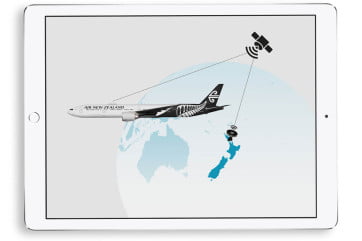
Our Wi-Fi signal goes from your device to an antenna on top of the aircraft. It then heads into space, where a satellite picks it up and sends it back to earth. Your data comes back to the satellite, down to our jet and back to your device.
Even at 800km per hour, you only travel 450 metres between sending and receiving.
This world-leading technology has been provided by Inmarsat, together with Panasonic Avionics. Kia ora, guys!
Flying globally means sometimes we may briefly go through a Wi-Fi blackout area. These don't typically last long so you should be connected again shortly.
How to connect in the sky
- Switch your device to Flight Mode
- Wait for a few minutes after takeoff
- Turn on your device's Wi-Fi while staying in Flight Mode
- Join the AirNZ_InflightWiFi network
- Go to wifi.airnz.com
- Follow the on-screen connection instructions
- Enjoy for free until your aircraft prepares for landing
All of these instructions are available on board. Our crew can help you get online too.
Need some Wi-Fi help?
Trouble staying connected? Here are a few possible reasons why.
Did you connect to the network?
Did you register?
Refresh and try again
Try again in 10 minutes
Are we about to descend?
Were you on a VPN?
Something taking a little too long?
For extra details, please see our Wi-Fi terms of use.